

Vercel AI SDK Authorization
Add Veto tool-call guardrails to the Vercel AI SDK. Authorize generateText and streamText tool calls before execution.
Veto adds Vercel AI SDK authorization by intercepting tool calls between model output and execution. The middleware validates each generateText or streamText tool call against policy before the tool runs, so high-risk actions are allowed, denied, or routed to human approval instead of executing blindly.
TypeScript only, no Python equivalent.
When should I use this?
Use Veto middleware when your Vercel AI app can call tools that change state, spend money, expose data, or deploy code. Typical protected actions include send_email, transfer_funds, deploy, and delete_file. Prompt instructions are not enough for these operations; tool-call guardrails must run before execution.
Installation
npm install veto-sdk ai @ai-sdk/openaiQuick start
import { Veto } from 'veto-sdk';
import { createVetoMiddleware } from 'veto-sdk/integrations/vercel-ai';
import { generateText, wrapLanguageModel } from 'ai';
import { openai } from '@ai-sdk/openai';

const veto = await Veto.init({
  baseUrl: process.env.VETO_API_URL ?? 'https://api.veto.so',
  apiKey: process.env.VETO_API_KEY!,
});
const middleware = createVetoMiddleware(veto);

const model = wrapLanguageModel({
  model: openai('gpt-4.1'),
  middleware,
});

const result = await generateText({
  model,
  tools: myTools,
  prompt: "Send an email to alice@example.com",
});
Runnable SDK example
See:
packages/sdk/examples/vercel-ai-sdk/vercel_agent.ts
The example includes both:
veto.guard(...)preflight checks (returns typed decisions without executing tools)- wrapped execution path via
veto.wrap(...)(enforces policy at execution time)
Options
| Option | Type | Default | Description |
|---|---|---|---|
approvalMode | 'deny' | 'wait' | 'deny' | Treat require_approval as a block, or wait for the approval record to resolve before forwarding the tool call |
approvalTimeoutMs | number | SDK approval default | Maximum time to wait when approvalMode: 'wait' |
approvalPollIntervalMs | number | SDK approval default | Poll interval when waiting for approval |
onAllow | (toolName, args) => void | Called when a tool call passes validation | |
onDeny | (toolName, args, reason) => void | Called when a tool call is denied | |
onRequireApproval | (toolName, args, result) => void | Called when Veto returns require_approval | |
throwOnDeny | boolean | false | In streaming mode, throw instead of silently dropping denied calls |
failClosed | boolean | true | If Veto cannot be reached, block the tool call instead of allowing it |
How it works
The middleware implements the Vercel AI SDK's v3 specification with wrapGenerate and wrapStream hooks.
generateText mode
After the model generates tool calls, the middleware validates each one before execute() runs:
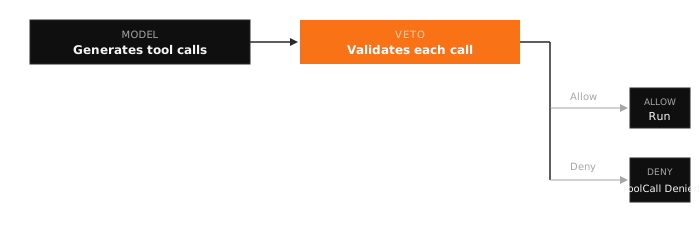
In generateText, denied tool calls always throw ToolCallDeniedError regardless of the throwOnDeny setting.
streamText mode
In streaming mode, the middleware buffers tool-related chunks (tool-input-start, tool-input-delta, tool-input-end) until the tool-call chunk arrives. At that point it validates:
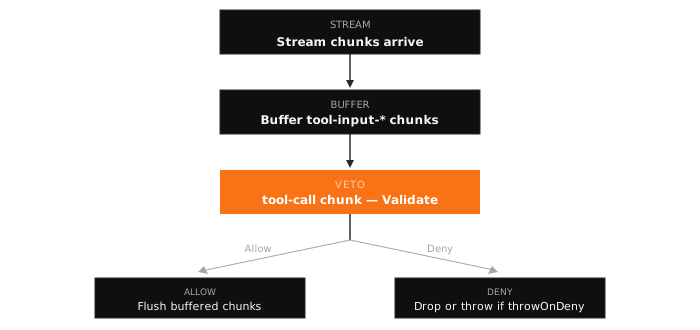
throwOnDeny: false(default): Denied tool calls are silently dropped from the stream. The consumer never sees them.throwOnDeny: true: ThrowsToolCallDeniedErroron the first denied call.
Argument modification
When Veto's validation modifies the tool call arguments (via finalArguments), the middleware forwards the modified arguments to execute():
- In
generateText: replacestoolCall.argsdirectly - In
streamText: emits a single modified chunk instead of the buffered input deltas
Example with streaming
import { streamText, wrapLanguageModel } from 'ai';
import { createVetoMiddleware } from 'veto-sdk/integrations/vercel-ai';

const middleware = createVetoMiddleware(veto, {
  onDeny: (toolName, args, reason) => {
    console.warn(`Blocked ${toolName}: ${reason}`);
  },
  throwOnDeny: true,
});

const model = wrapLanguageModel({
  model: openai('gpt-4.1'),
  middleware,
});

const result = streamText({
  model,
  tools: myTools,
  prompt: "Transfer $50,000 to external account",
});

for await (const chunk of result.textStream) {
  process.stdout.write(chunk);
}
Exports
import { createVetoMiddleware } from 'veto-sdk/integrations/vercel-ai';

import type {
  VetoVercelMiddleware,
  CreateVetoMiddlewareOptions,
} from 'veto-sdk/integrations/vercel-ai';
Troubleshooting and FAQ
Why did my tool call disappear in streamText?
With throwOnDeny: false, denied streaming tool calls are dropped from the stream. Set throwOnDeny: true or add an onDeny callback if you want to surface a denial to logs, UI, or tests.
Does this protect both model output and tool execution?
It protects the execution boundary. Veto evaluates the tool name and arguments after the model proposes a call and before execute() runs. Pair it with input/output validation if you also need content filtering or redaction.
Can I require human approval from a Vercel AI app?
Yes. Use a Veto policy with action: require_approval for sensitive tools such as transfer_funds, production deploy, or irreversible delete_file calls. By default, middleware blocks approval-required calls and exposes the approval through onRequireApproval. Set approvalMode: 'wait' to wait for the approval record before the tool call is forwarded.