

How Validation Works
Architecture of Veto's three validation paths, client-side deterministic, server-side deterministic, and server-side LLM.
When you wrap tools with the Veto SDK, every tool call goes through a validation pipeline before execution. The pipeline picks the fastest validation path that can handle your policy.
The validation pipeline
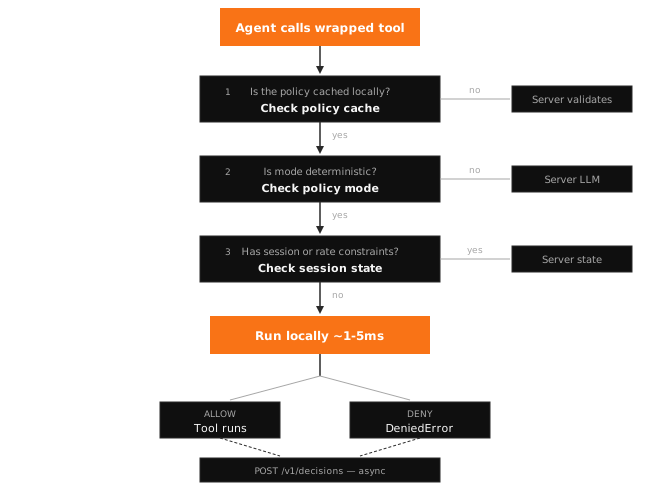
Path 1: Client-side deterministic
The fastest path. The SDK evaluates constraints locally using a cached copy of the policy.
When it triggers:
- The tool's policy is cached (fetched on first call, background-refreshed every 60s)
- The policy mode is
deterministic - The policy has no session constraints or rate limits
What it checks:
- Number ranges (
minimum,maximum,greaterThan,lessThan) - String validation (
enum,regex,minLength,maxLength) - Array bounds (
minItems,maxItems) - Required/null checks (
required,notNull)
Latency: ~1-5ms (no network call)
Decision logging: The decision is sent to POST /v1/decisions asynchronously so the dashboard stays accurate. This never blocks tool execution.
See Constraints Reference for every supported constraint type.
Path 2: Server-side deterministic
The server evaluates the same constraint types as client-side, but also handles stateful checks that require server coordination.
When it triggers:
- Cache miss (first call for a tool, or policy expired)
- Policy has session constraints (per-session call limits, argument tracking)
- Policy has rate limits
What it checks: Everything client-side checks, plus:
- Session constraints (e.g. "max 3 calls to
delete_recordper session") - Rate limits (e.g. "max 10 calls per minute")
- Cross-tool constraints (e.g. "if
read_filewas called, blocksend_email")
Latency: ~30-50ms (one network round-trip)
Path 3: Server-side LLM
An LLM evaluates the tool call against natural language policies and exception lists. Use this for checks that can't be expressed as static constraints.
When it triggers:
- Policy mode is
llm
What it checks:
- Semantic evaluation against the policy description
- Exception lists (e.g. "deny transfers to external accounts, except for verified vendors")
- Complex multi-argument relationships
- Context-dependent decisions
Latency: ~500-2000ms (network + LLM inference)
Supported models: Claude (Anthropic), GPT-4o-mini (OpenAI). Configured per-policy in the dashboard.
Policy cache
The SDK caches policies locally using a stale-while-revalidate strategy:
| Window | Duration | Behavior |
|---|---|---|
| Fresh | 0 – 60s | Serve from cache immediately |
| Stale | 60s – 5min | Serve from cache, refresh in background |
| Expired | > 5min | Cache miss, fall through to server |
When a policy is stale, the SDK returns the cached version instantly while fetching the latest version in the background. This means validation latency is consistently low even when policies change, the next call after the background refresh completes will use the updated policy.
Policy changes made in the dashboard take effect within 60 seconds on all connected SDKs.
Decision flow for approvals
When a policy is configured for human-in-the-loop review, the server returns require_approval instead of allow or deny:
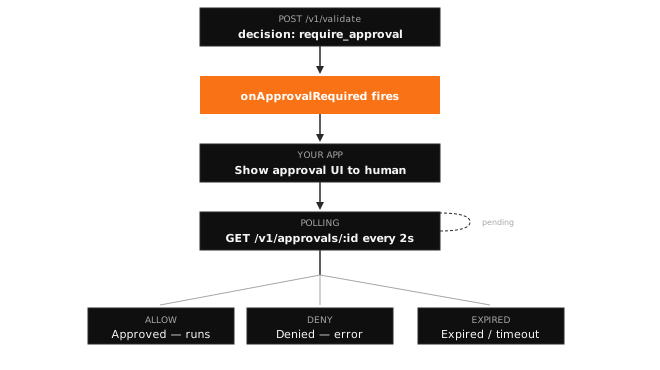
Configure the approval hook when initializing the SDK:
const veto = await Veto.init({
  onApprovalRequired: (context, approvalId) => {
    // Show approval UI, send notification, etc.
  },
});
Session-aware validation
Veto can track per-session state, call counts, cumulative argument values, and enforce constraints that span multiple tool calls within a session.
Enabling sessions
Pass a sessionId when initializing the SDK or in the validation context:
const veto = await Veto.init({
  sessionId: "session_abc123",
});
Session constraints are always evaluated server-side since they require centralized state tracking.
Constraint types
| Constraint | Description | Example |
|---|---|---|
maxCalls | Maximum calls to a tool per session | maxCalls: 5, block after 5 calls to delete_record |
cumulativeLimits | Running sum of a numeric argument | argumentName: "amount", maxValue: 10000, block when total transfer amount exceeds 10K |
Session state
The server tracks state per session:
{
  "callCounts": {
    "transfer_funds": 3,
    "delete_record": 1
  },
  "cumulativeValues": {
    "transfer_funds": {
      "amount": 4500
    }
  }
}
callCounts increments on every validated call. cumulativeValues accumulates non-negative, finite numeric argument values. Non-numeric or negative values are ignored for cumulative tracking.
How constraints are checked
- maxCalls: Checked before the current call is recorded. Fails if
callCounts[toolName] >= maxCalls. - cumulativeLimits: Checked against
currentSum + incomingValue > maxValue. Returns the first failing constraint.
Configure session constraints via the Policies API using the sessionConstraints field.
Plan limits
| Feature | Free | Team | Business | Enterprise |
|---|---|---|---|---|
| Decisions/month | 10,000 | 100,000 | 1,000,000 | Unlimited |
| Policy generations/month | 10 | 100 | 1,000 | Unlimited |
| Agents | 1 | 10 | Unlimited | Unlimited |
| Log retention | 7 days | 30 days | 90 days | Unlimited |
| Dashboard | Yes | Yes | Yes | |
| Human-in-the-loop | Yes | Yes | Yes | |
| Analytics | , | Yes | Yes | |
| Compliance exports | , | Yes | Yes | |
| SSO | , | Yes | Yes |
Offline validation modes
Besides Veto Cloud, the SDK supports three offline modes that don't require the Veto server:
| Mode | How it works | Config key |
|---|---|---|
| Custom | Calls an LLM provider directly (OpenAI, Anthropic, Gemini) | validation.mode: "custom" |
| Kernel | Uses a local Ollama model | validation.mode: "kernel" |
| API | Sends to a self-hosted validation endpoint | validation.mode: "api" |
See Validation Modes for configuration details.