

What is Veto?
Veto documentation for explicit machine authority, MAP artifacts, local evaluation, human approval binding, and verifiable receipts.
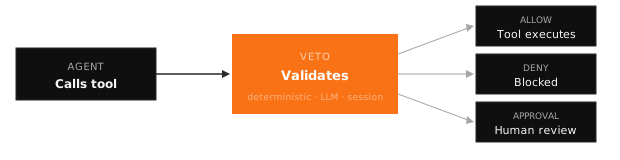
Veto is the machine authority runtime for agent actions. Agents often have technical capability to call tools, reach APIs, and change systems. Veto answers the separate authority question: what may this machine action do, under which artifact, with which constraints, approval, expiry, and receipt?
Using an AI coding agent?
Copy the integration prompt — paste into Claude Code, Cursor, OpenCode, or another agent workspace. Full details
TypeScript in one minute
npm install veto-sdkimport { protect } from "veto-sdk";
const tools = await protect([
{
name: "issue_refund",
execute: async ({ amount_usd }: { amount_usd: number }) => {
return { refunded: amount_usd };
},
},
]);What Veto Gives You
- MAP artifacts: portable authority objects with subject, action, resource, constraints, approval, expiry, and receipt fields.
- Local runtime: deterministic evaluation by default, with no account, API key, or network needed for the core decision.
- Approval binding: human approval is bound to the exact action hash and policy hash, so mismatched approvals fail closed.
- Receipts: offline-verifiable records that bind action, policy, approval, previous receipt, and issued-at time.
- Authoring surfaces: LLM drafting may propose artifacts for human review; it is not in the authority decision path.
- Adapters: existing authorization, policy, and governance tools can be wrapped into MAP receipts without making Veto an IAM system.
Current SDK Surfaces
| Surface | Import |
|---|---|
Core — Veto, protect, VetoAdmin, guard, approvals | veto-sdk |
| CLI utilities — init, learn, compile, test, scan, diff, replay | veto-sdk/cli |
| Provider adapters — OpenAI, Anthropic, Gemini, MCP | veto-sdk/providers/adapters |
| Vercel AI SDK middleware | veto-sdk/integrations/vercel-ai |
| Local rule utilities | veto-sdk/rules |
| Decision receipts — canonical schema, hashing, NDJSON, chain verification | veto-receipt-protocol |
| Charter authoring | REST API POST /v1/charter/turn |
Next Steps
| Where to go | What you'll learn |
|---|---|
| Quick Start | Put one machine action behind explicit authority |
| TypeScript SDK | Current SDK API surface |
| Charter SDK | Authoring workflows for human-reviewed policy drafts |
| Vercel AI SDK | Middleware for AI SDK tool calls |
| MCP API | Native MCP surfaces for tool registration and guarded execution |
| Decision Receipts | Portable, offline-verifiable proof of every decision |